●
Equipment Repair Form
● Wave
Radio without CD
●
Wave Radio with CD
●
Lifestyle CD-5 single disc
● Acoustic Wave®
CD-2000,
CD-3000
● Acoustic Wave®
AW-1 with Cassette
●
Lifestyle Systems
●
Acoustimass Modules
●
Residential, Built-In
●
Remotes
●
Accessories For Sale
●
Lifestyle
Cable Identification
|
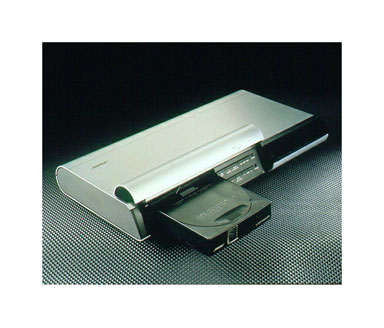
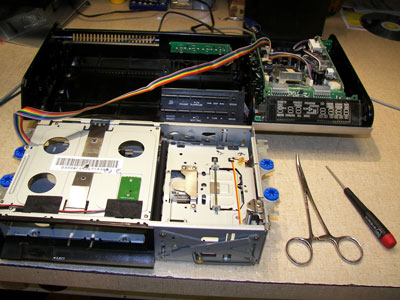
Bose Lifestyle Model 20, C-1
Repair Information
|
PLEASE READ: If your CD
cartridge is stuck and won't eject its because something in the mechanism is
broken. Forcing the cartridge out with a screwdriver will only do
more damage. Typically the cartridge, your
CD,s and additional parts inside will be damaged.
Include any extra magazines you may have when sending in your unit.
The magazines need to be checked
for possible defects that need to be addressed.
Flat Rate repair for a complete
overhaul is
$499.95 parts and labor plus return shipping
and handling.
See terms and conditions for additional information.
Each piece of Bose equipment we receive is inspected and checked for current revisions and upgrades.
Equipment is fully checked and tested after repair to ensure original
factory performance.
|
Tips to keep your Model 20 in good operating condition.
|
1. Clean both sides of your CD's before inserting in the 6 disc
cartridge.
2. Do dot use the "Random" play mode. This causes excessive wear on
the CD mechanism.
3. Do dot use "stick on" labels on your CD's. Labels get stuck inside
causing jamming and broken parts.
4. Remove CD's from cartridge before shipping (if possible). CD's
will fall out of the cartridge while inside.
5. Do not blow out dust with compressed air. Dust will stick to oil
and grease causing instant problems.
6. Do not let a service shop work on your unit if they are not fully
experienced with past repairs of a Model 20.
Proper repairs require special Bose test
fixtures, alignment procedures and factory documentation including
service bulletins and upgrades.
7. Do not use any other power adaptor than the original Bose item
(Model PS71). Incorrect adaptors will cause
poor performance or may damage internal
electronic components.
|

Input - Output connections
Separate AM and FM antennas are required for radio reception. 12 volt
power is AC not DC.
The correct Bose adaptor is model PS71. The PS51 adaptors are underrated and
will overheat and fail.
Speaker zones require special Bose cables that are connected to Bose Accoustimass
modules.
Serial data as well as left and right analog audio is sent to the Accoustimass module via the
speaker zone cable.
Surround sound processing occurs in the Acoustimass module.
Aux & Video 1 & Video 2 inputs are standard line level audio inputs.
|
|
Known Model 20
issues.
RF/EMI
interference with CD changer operation.
The CD changer may
not operate properly when placed on top of or near other electronic
equipment. There is no internal shielding to prevent interference.
Solution: place a grounded shield between the Model 20 and other equipment
or move Model 20 to a different location.
Blank
display.
This is a common
complaint and requires replacement of internal electronic components
with upgraded
parts by a qualified service technician.
Lifestyle Model
20 dead
My Lifestyle system
appears to be dead, which unit is bad? Often times the display on the
Model 20 will go blank even though the system is powering up. If this is
the case then audio would still come through the speakers when a radio
station is tuned in or if a CD is playing, assuming the CD section is
working ok. Also make sure to turn up the volume during these tests.
These steps can be difficult to determine since the display is not
lighting up. If sound comes through ok then the Model 20 has defective
display circuits and can be sent in for repair.
Perform the
following to determine the condition of your Model 20 with a blank display.
- Verify the power
adaptor is a Bose model PS71. If it is not, then get one.
- Un-plug the
power cord from the wall or on back of the Model 20.
- Connect a set of
headphones to the headphone jack on the right side of the Model 20.
- Plug power
adaptor in. If you here a single "pop" sound in the headphones then to
Model 20 is getting power. If no pop is heard then the power adaptor is
probably defective. The power adaptor can be tested with an AC
voltmeter. It should read 14 to 15 volts AC. Be sure to set the
voltmeter to the AC range, not DC. The power adaptors are very
reliable and seldom go bad. DC output adaptors will not work!
- As a backup test
to using headphones, you can load an empty CD cartridge into the
Model 20. You will here the CD mechanism try to load each of the 6 slots
then stop.
- Press the ON/OFF
button on the Model 20. If the power adaptor is ok, the Model 20 will come
on in the FM radio mode so you should here static in the headphones
and be able to tune in radio stations. Be sure to connect an FM
antenna and turn up the volume.
- Insert a loaded
CD cartridge and press the “source select” button 6 times. This will
put the Model 20 in the CD mode and should start playing the first CD. If
the Model 20 makes the loading sound on each of the 6 CD’s but no sound
is heard thru the headphones then the CD mechanism is defective.
CD cartridge
randomly gets stuck while ejecting.
There are many
reasons why this occurs. If your unit has not been serviced
correctly in the past 5 years or more then the time is now. A full
overhaul will address several problem areas. Several electronic and
mechanical components need to be upgraded for increased reliability.
Cleaning, lubrication and alignment are needed for proper operation.
|
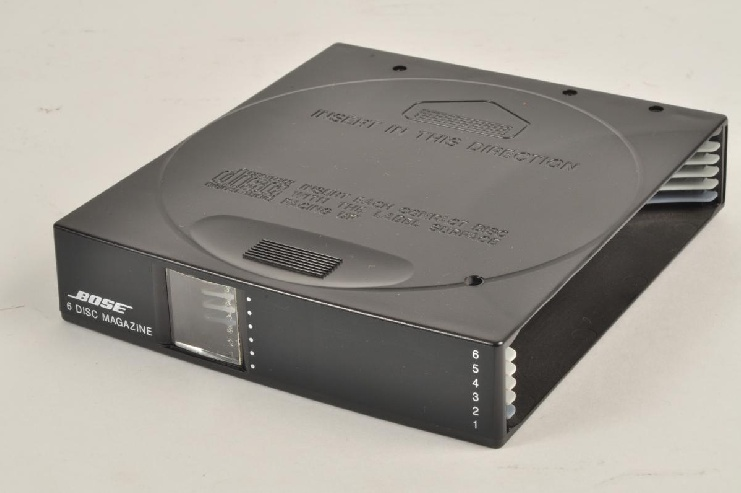
We have a limited quantity of Lifestyle
20, 6 disc magazines, used in good condition, call to order. $29.95 ea
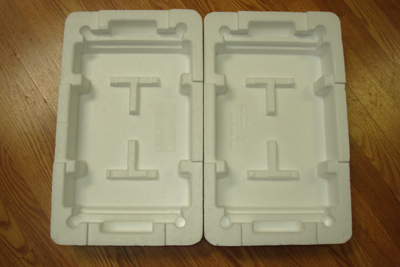
Don't use the rigid Styrofoam to ship your
unit.
This material is to rigid and does not provide adequate
cushioning to protect internal mechanism.
|